Today, we’re talking about two main objectives – the first one being how to actually turn off AI for your Pinterest account. And then the second point is what the implications of AI are going to have on the career future of Pinterest managers. Is AI going to really replace the need for Pinterest managers? Read on to find out!
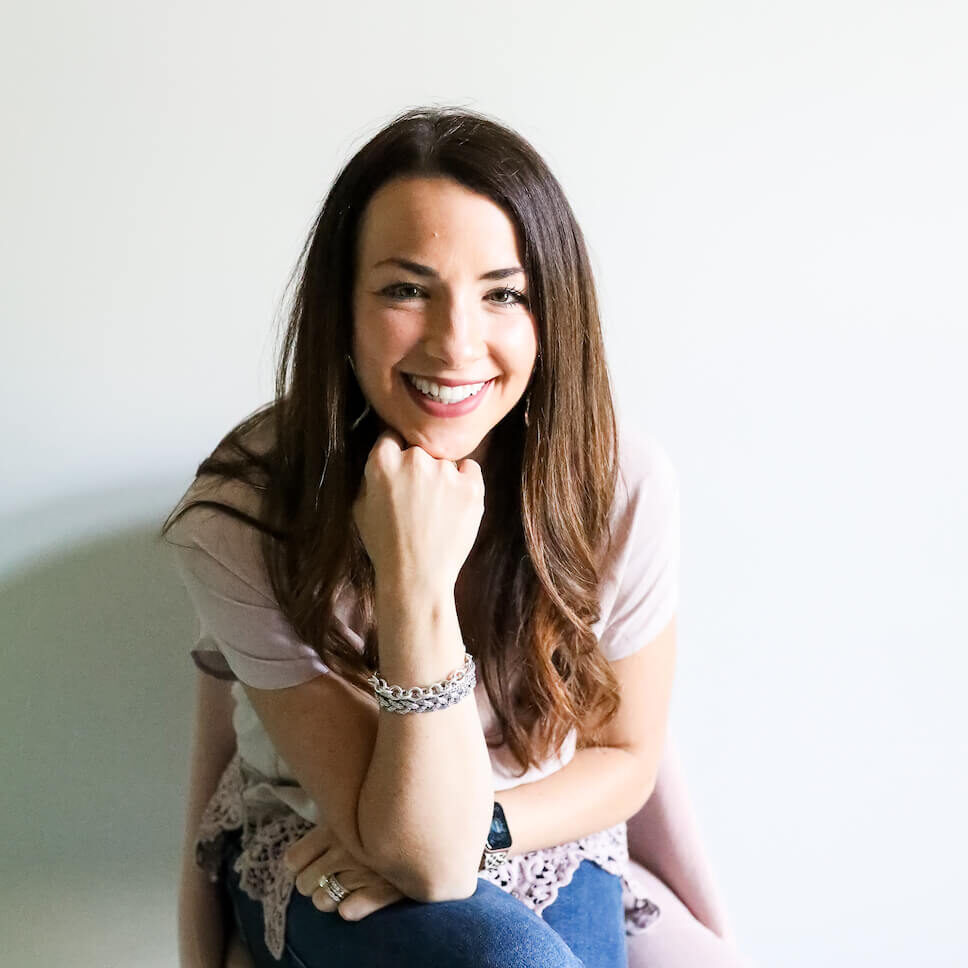
Hi, I’m Emilee Vales!
It’s been a hot minute since I’ve shared a little intro about me on the blog, so this is overdue!
I’m Emilee Vales, a Pinterest marketing expert and coach. For over six years now, I have been helping my clients increase their traffic and turn it into profit through the power of Pinterest marketing.
And for almost three years now, I have been training and coaching women and helping them start their Pinterest management business. These women experience the same transformation I have through working from home as a freelance Pinterest Manager.
So, right now I have two different specialties.
One is just for business owners who want to take the DIY route with their Pinterest accounts, or maybe hire a Pinterest manager from my Academy students, who are fantastic!
The second offer is for those who are looking to start their Pinterest management business and work from home as a freelance Pinterest manager!
If that’s you, I do have a secret Pinterest manager podcast that you should listen to, like yesterday. 🤣 It is 10 episodes that you can binge right now! These episodes take you behind the scenes of how I started and scaled my business working from home part-time hours, and making a full-time income.
Okay, now that’s done! Without further ado, let’s go ahead and dive into this post.
(Watch the video version of this post here!)
What Generative AI means and How it’s Impacting Pinterest
The teacher in me can’t help but really lay out where we are going to go. What is the objective of this episode? What are you going to get out of this?
So there are two main points that I want you to take away from this. The first one is how to actually turn off AI for your Pinterest account if you want more of the real images, the real inspiration.
And then the second point that I want to make, and it’s something that I’ve been getting asked about more and more, and it’s a very valid point, is what are the implications of AI going to have on the career future of Pinterest managers? Is AI going to really replace the need for Pinterest managers?
Going to give a huge spoiler alert, absolutely not.
I want to dig into that with that second point and explain why I don’t see AI as a threat to the role of the Pinterest manager. But before we get into that, let’s talk about how to turn off AI for your Pinterest account.
How to Turn Off AI for Your Pinterest Account
So, recently, Pinterest announced that you can turn off Gen AI. And what Gen AI, it’s just really a shorter way to say generative AI. And I think it’s kind of obvious some of the reasons why you would want to turn off AI.
I want to share one of my stories and why I’m not the biggest fan of AI. I think that AI is a tool, and it can be used in certain situations, obviously, to save time and effort. But whether it’s Pinterest management or another career, I don’t believe that AI is going to totally replace the person in any role.
And maybe that’s an unpopular opinion, but I’m saying it. I’m standing by it.
And it’s just because I have used AI in my business, because I do believe in adapting with the times. I don’t want to become outdated or obsolete. Not only do I want to stay up with business best practices, but I want to work smarter and not harder, right? But the more I use AI, I do see it.
It’s a beneficial tool, but I don’t see it as something where I’m like, “Oh, yeah. I don’t need this person in my business or this person on my team anymore because of AI.”
My Experience With AI and Why It Could Crush the User Experience
So, here’s a story where AI has impacted my experience with Pinterest. My daughter recently had this epiphany that she wanted to redo her room, and she wanted to get a new bed. Well, in her defense, the bed she has right now is one that we set up when she was getting ready to turn four. And now she’s going to be eight.
So, I said, “Okay, it’s time, you know, we can get a new bed.” And I told her, “Let’s go to Pinterest and get some ideas for your new room so that we can put it together and it looks really nice, and it’s a great place to get inspiration.”
So, we went to Pinterest, and she’s sitting there with me (actually, this is one of the first times I’ve done this with her; we try to be as screen-free as possible), and it was kind of fun to look at Pinterest with her.
And we’re searching for bedroom ideas for girls, and all of the ideas that kept coming up were these outlandish bedrooms where it’s a bunk bed, and it shows this like a slide going into a pool, and just almost outlandish!
And I will say Pinterest does label pins that have AI-generated images, and so I said, “Oh, that has an AI level,” and I’m trying to explain to her, like what AI is, but then also that this is not realistic. We can’t have a slide going from a bunk bed into a pool in your bedroom. Um, we don’t even have a pool in our backyard! We’re not going to put a pool in your bedroom.
So, I mean, she understood that, but at the same time, it was hard to get inspired when all of the ideas were incredibly unrealistic.
Moral of the AI Story…
To this move to Pinterest marketing, I actually saw somebody that I follow who is also a Pinterest marketer talk about how it was such a smart and a strategic move by Pinterest to allow people to toggle off that gen AI feature because the thing is, people are going to lose inspiration and feel like everything is unattainable because it’s not real if everything is AI.
There’s this very real need for real people creating real ideas and providing real inspiration. And so I am a huge fan of this ability to toggle off AI.
As I mentioned before, I’m not here to villainize AI and say that there is no purpose for it. But I do want to say that we need to be strategic about what we’re sharing. It’s really important to prioritize high-quality content, whether you are the creator or somebody who’s the consumer and telling these platforms like, hey, this actually doesn’t serve me, and I want to see less of it.
How to Turn off AI on Your Pinterest Account
So now, I want to actually show you how to turn off this feature. If you’re like, heck yes, Emily, show me how to turn this off – I want to do this on my Pinterest account!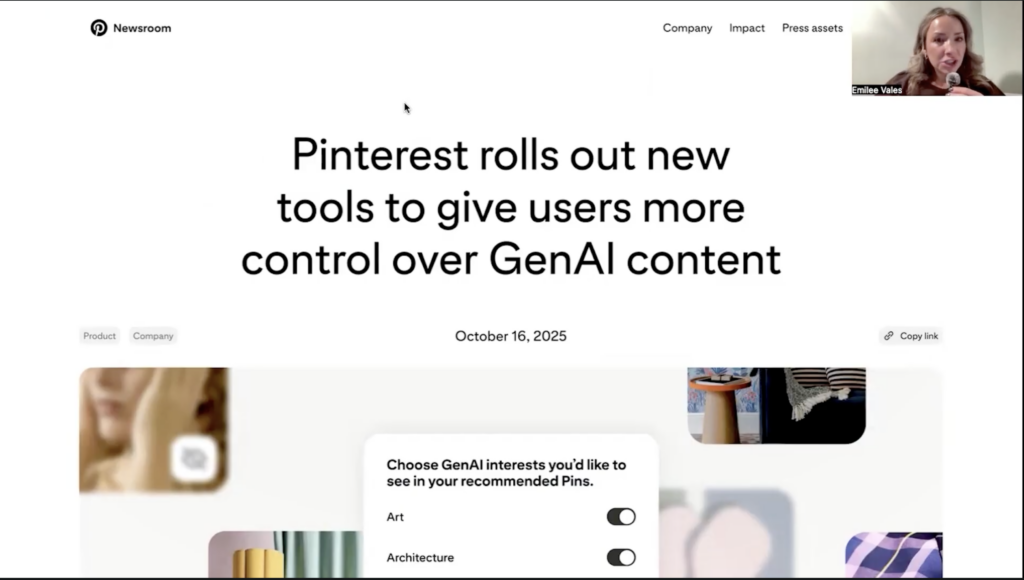
Okay, so we are obviously looking at my computer screen. I wanted to share this article with you. This is from the Pinterest newsroom, and it really just breaks down this shift that they’re making and why they are allowing you to toggle this feature off.
It says now users can dial down the AI and add more of a human touch. I think that’s what we all want to get back to with Pinterest, at least speaking for myself personally. So, as I mentioned, this article is super beneficial. I’ll let you read that for yourself. ❤️
I’m not going to sit here and read that to you, but I think that’s one of the most powerful statements in that article and why they’re doing this. I just commend Pinterest for making that shift because in order to create a great user experience, I think that we do need to get back to real ideas and real inspiration. 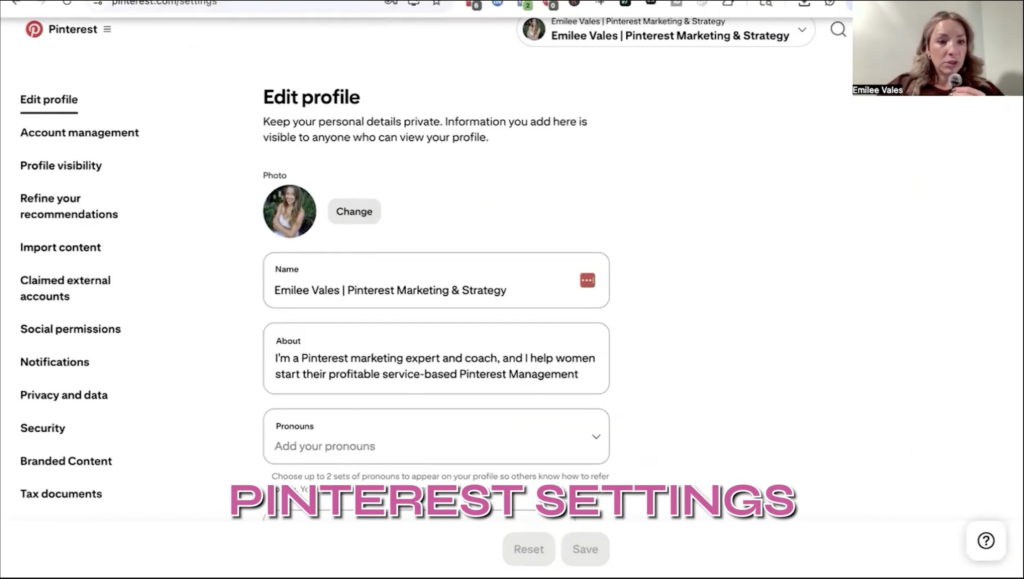
So, I do want to pop over now to my Pinterest account. I am logged in to Pinterest, and I want to show you how to toggle this off if you would like to do this on your account. So, what I’m going to do is I’m going to jump over to my Pinterest settings.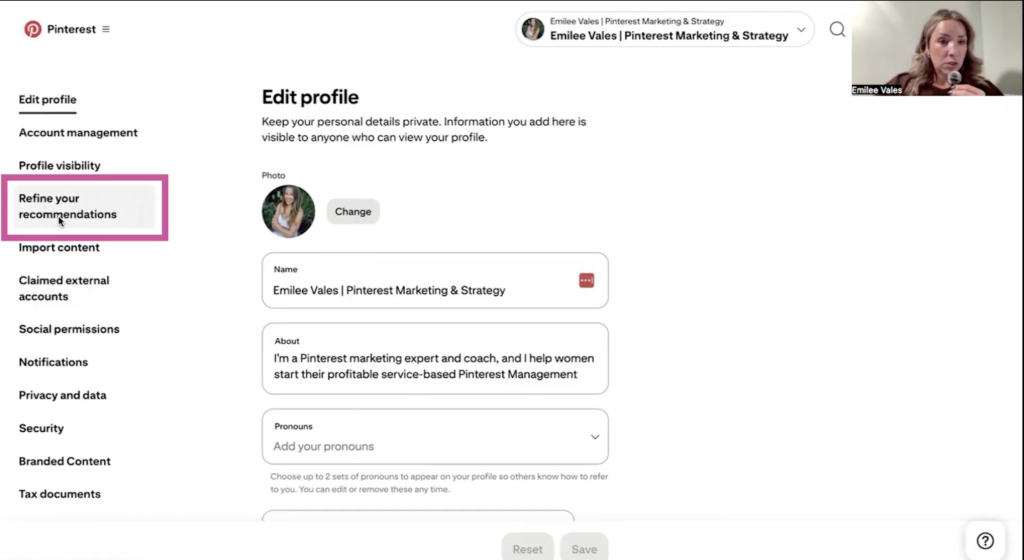
Step one, go to your Pinterest settings, and then you’re going to click on the left side, refine your recommendations. 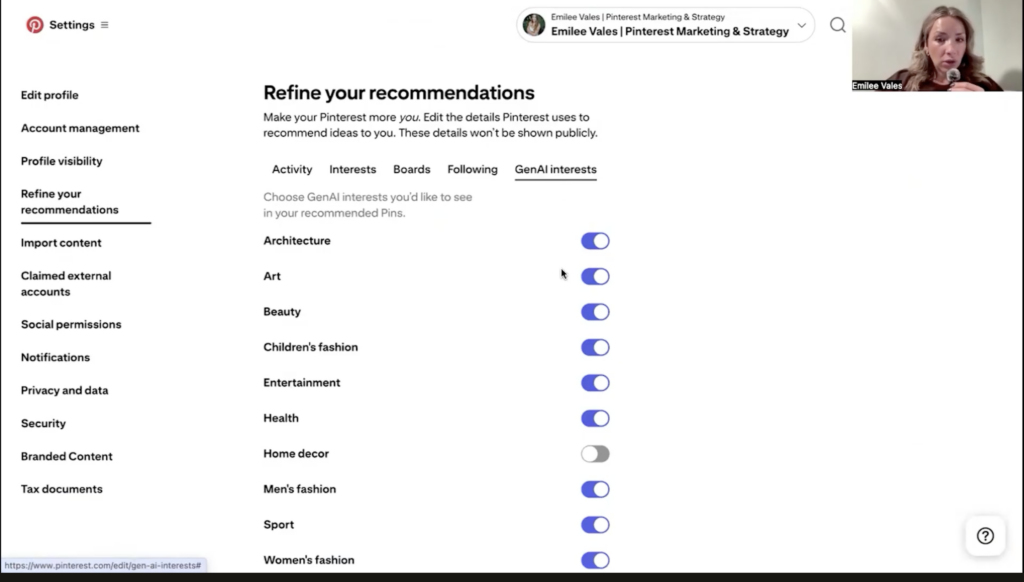
Now, you’ll see activity interest boards following, and then you’ll see GenAI interests. So in order to toggle these off, you can simply switch them off.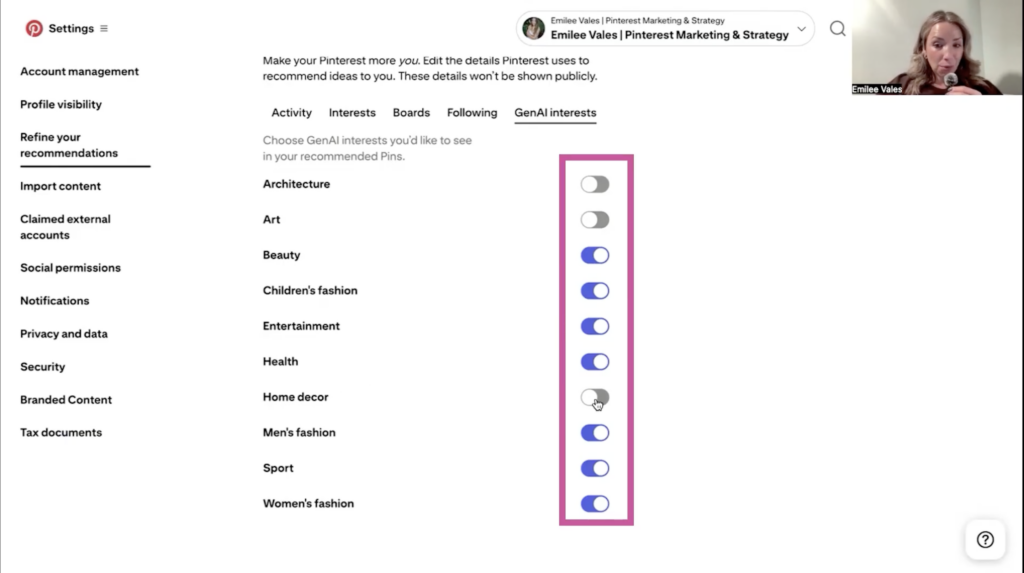
And if you want to leave some of them on, you can. You’ll see here, down on home decor, I have this toggled off already. And what I actually did on my iPhone was on the Pinterest app. I clicked on a pin, and it was a picture of a kitchen, and it looked a little bit fake, right?
The truth is, we are all able to somewhat able to now kind of see and just know right away when a Pinterest is AI. And I will say that this kitchen wasn’t outlandish. It wasn’t like, “Oh my gosh, that is so fake. That could never be possible.” But I could just tell it was AI. And so I clicked on the pin, and of course, it had the AI label, which I do like that they’re also labeling their pins with AI.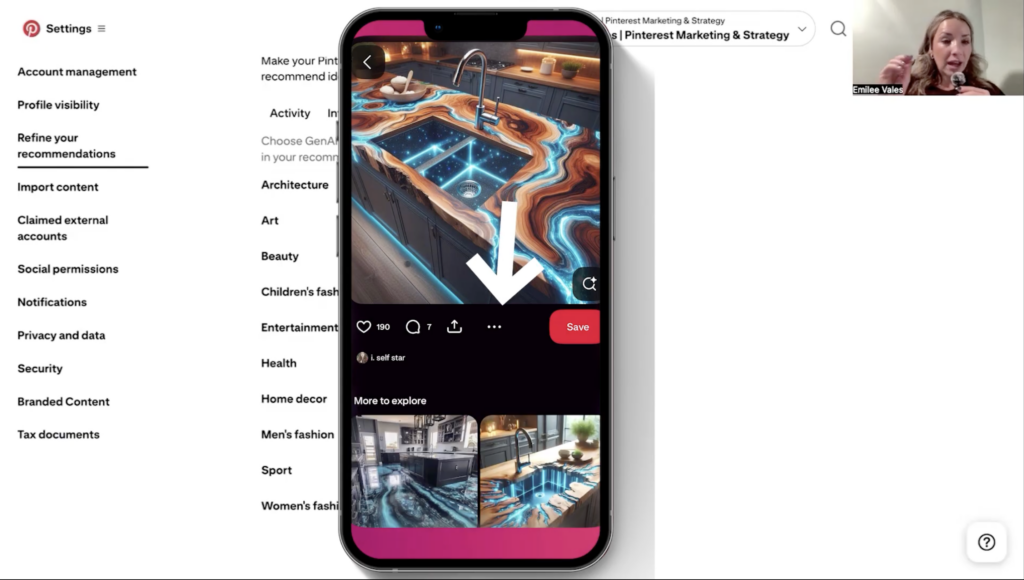
But if on that pin, once I was looking at it, underneath it, there are three dots. I clicked on the three dots, and I clicked on “see less of this.”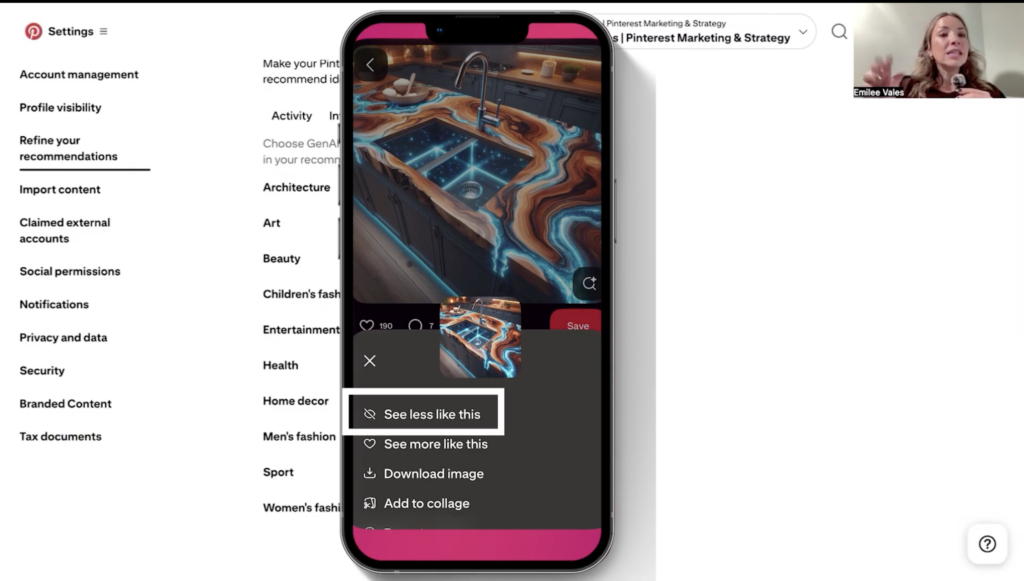
It was home decor, but it actually toggled off that Gen AI interest for home decor. So you can do this on your Pinterest app on your phone. And like I said on the pin, you’ll just click on underneath the pin image; there are three dots. You can just click on those, and I just clicked on “see less of this,” and it toggled that off. But if you decide to turn it back on, you can do that as well.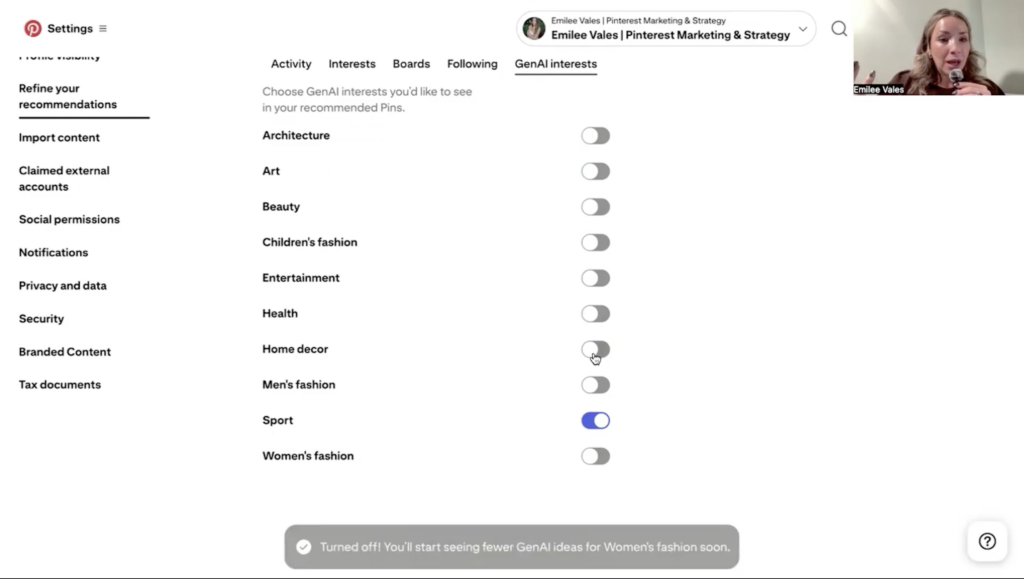
So you can see here, I’m going to toggle all of these off, and it says “turned off.” You’ll see fewer Gen AI ideas for entertainment soon. So I could toggle all of these off, and I’m going to see less AI content. As I mentioned before, at any time, if you want to turn those back on, then you can do that.
This is just a quick how-to if you would like to do this on your account. And I am super curious to hear your thoughts. Will you be doing this for your Pinterest account now?
What Implications Does AI Have for Pinterest Managers?
This is so important because I still manage accounts here in 2025. And, I have plans for continuing to work as a Pinterest manager in 2026.
So yes, I do train and coach people and teach them how to start their freelance Pinterest management business, but I still do have my hands in the work as well. And so it’s just important for me, as I mentioned before, to continue to evolve and make sure that I am staying up to date with best practices as well.
Utilizing AI Strategically for Pinterest
Some of the ways, as a Pinterest manager, that I have utilized AI is with Tailwind. They have a few different ways that you can utilize AI, one being the ghostwriter feature. If you’d like to learn more about that, here’s a YouTube episode where I share how to use Tailwind’s ghostriter feature, which helps you write keyword-optimized descriptions.
They also have the smart pin feature, which I also created a YouTube episode about, where you’re using the smart pin feature to create images, and both are essentially artificial intelligence. You’re writing a Pinterest pin description faster, and you’re designing the pin faster.
I’ve used both features and I could see where you would use them, but as I’ve used them, I have noticed they I don’t think that they are going to replace the person.
Even with the description, I’m having to specifically tell Tailwinds the keywords I want to include in the description so that I make sure I’m ranking for those pillar keywords. And then also with the images, I can give Tailwind the images I want incorporated in the pin. I can also give Tailwind my brand colors. Once again, I’m still having to give AI my inputs; there still is a person involved in the equation.
But even after there’s been a person who has given the artificial intelligence the inputs it needs, I still will say that the pins like they’re okay.
If you are in a bind and you need to create a couple of additional pins, that’s fine. But I still find that the pins that I am sitting down and designing myself perform better.
I’ve also done the same thing on Canva, where I have X amount of brand photos, and I really am the face of my brand, so I’m using a lot of pictures of myself, typically. Just to test, I have actually used AI and told AI on Canva that I want to have “a mom who’s working from home,” and it’s essentially an artificial image that I’ve created.
I just don’t find that they perform as well on Pinterest. They don’t resonate the same with people who want inspiration. And so, I just don’t believe that AI is ever going to replace humans!
So if you’re a Pinterest manager and you’re fearing this, just know that I don’t see a world where it’s going to replace you or the need for your services!
Where AI Can’t Go…
Apart from the images and the pin description, the other area where you really need a real person to be working on your Pinterest account is scheduling out your content.
But to schedule out that content and even design the pins and know what keywords to input, even if you are using AI to a certain extent, you need to have somebody who understands how Pinterest works. Someone who understands it is a visual search engine, what really makes the platform tick, what’s landing well, what’s working well.
You need to have somebody who can create and implement a Pinterest strategy for you. And in order to understand if that Pinterest strategy is working well, you need to look at the data.
This is exactly something I teach my students to do, and what I have always done as a Pinterest manager. This looks like creating a monthly report that I send to my client and share what’s working well and what could be improved upon. I also pay attention to the trends that are coming up, such as the seasonal trends.
Another area I always look at is Pinterest Predicts, which they release every December, and it’s really giving these trend predictions for the upcoming year. So all of those are things that I do as a Pinterest manager that AI is not going to do for you.
Let’s Wrap This Up
As you can see, there are a lot of different reasons why you still very much need a real person to work on Pinterest!
So, if you are thinking about starting your freelance Pinterest management business or you already are a freelance Pinterest manager, there is still a need for your services.
Ready to get started now? Be sure to check out my secret podcast, which is going to give you 10 episodes, and I’m really providing the behind-the-scenes for how I built and scaled my business to 5-figure months working part-time hours.
So, as we wrap up this episode, I would love your take on AI, what you think about AI in general, if you use it within your business, and if you’re going to toggle it off on your Pinterest account, because I love knowing what you’re going to do. ❤️
Until next time!